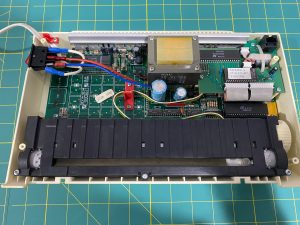
You are getting ready to program a project into your Passap console and a keypad button seems to not be working. Has this happened to you? There is a simple solution for the problem. The keypad contacts need cleaned. I use 90% isopropyl alcohol and a Q-tip to clean the contacts. You may want to use an anti static band while working on the board.
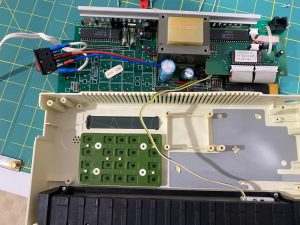
You must take the board out of the console to get to the contacts. First, remove the console from the machine. Then remove the screws from the back of the console to expose the computer board. I suggest taking a photo of the board at this point. It may help you see where all the screws go into the board when you are putting everything back together.
There are several short screws holding the board in the console and 4 long screws on the large square block. All the the screws must be removed. You will need to remove the entire board from the console and clean the keypad contacts which are on the back of the board. Lay the screws out carefully in an order which will help you with putting them back in. My console may look a little different than yours as it does have the daughter board in it for the 4600 motor. There is also a screw under the small board on the top right (in photo) which will need to be removed. Remove screws and gently pull up on the board to see if you have indeed removed all of them. The board should easily lift up if you have removed all the screws.
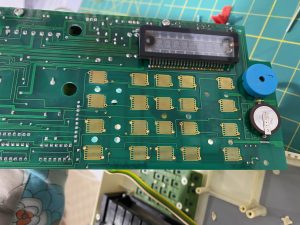
Once you have all the screws removed, flip the board over and look at the keypad contacts. There are several gold rectangles which are the keypad contacts. They may look fine but sometimes if you move the board in the light, you may see a slight hint of a circle on each pad. This very light circle impression is where the rubber keys make contact. Spend some time gently wiping each gold keypad contact with a Q-tip soaked in alcohol. If you were able to see that slight impression of the rubber key, be sure it is cleaned off of the gold contact. Wait a minute to be sure all the alcohol has evaporated and then screw the board back into the console. Before putting the back on the console box, plug it in and do a quick keypad test to be sure all the keys are working.
I want to thank my friend Carol who told me how to do this back when I first encountered this problem with a console. She has a tutorial on her blog.
Leave a Reply